---
title: Managing my account
description: We’ve made account management easy and accessible in just a few clicks. Learn how to manage, change or upgrade your account plan.
---
[Skip to content](https://help.getmobiz.com/managing-my-account-mobiz-help-center#main-content)
English
Show submenu for translations
[Create a Support Ticket](https://help.getmobiz.com/kb-tickets/new?hsLang=en)

Open main navigation
Close main navigation
- English
Show submenu for translations
- [Create a Support Ticket](https://help.getmobiz.com/kb-tickets/new)
- [Contact us](mailto:help@getmobiz.com)
[Contact us](mailto:help@getmobiz.com)
How can we help you?
- There are no suggestions because the search field is empty.
1. [Mobiz Help Center](https://help.getmobiz.com/?hsLang=en)
2. [Getting started with Mobiz](https://help.getmobiz.com/getting-started-with-mobiz?hsLang=en)
3. [1. Sign up](https://help.getmobiz.com/getting-started-with-mobiz?hsLang=en#1-sign-up)
# Managing my account
## We’ve made account management easy and accessible in just a few clicks. Learn how to manage, change or upgrade your account plan.
### Managing my account
To get started from your dashboard, click on **your name** in the top right corner, and navigate to **Account management**.
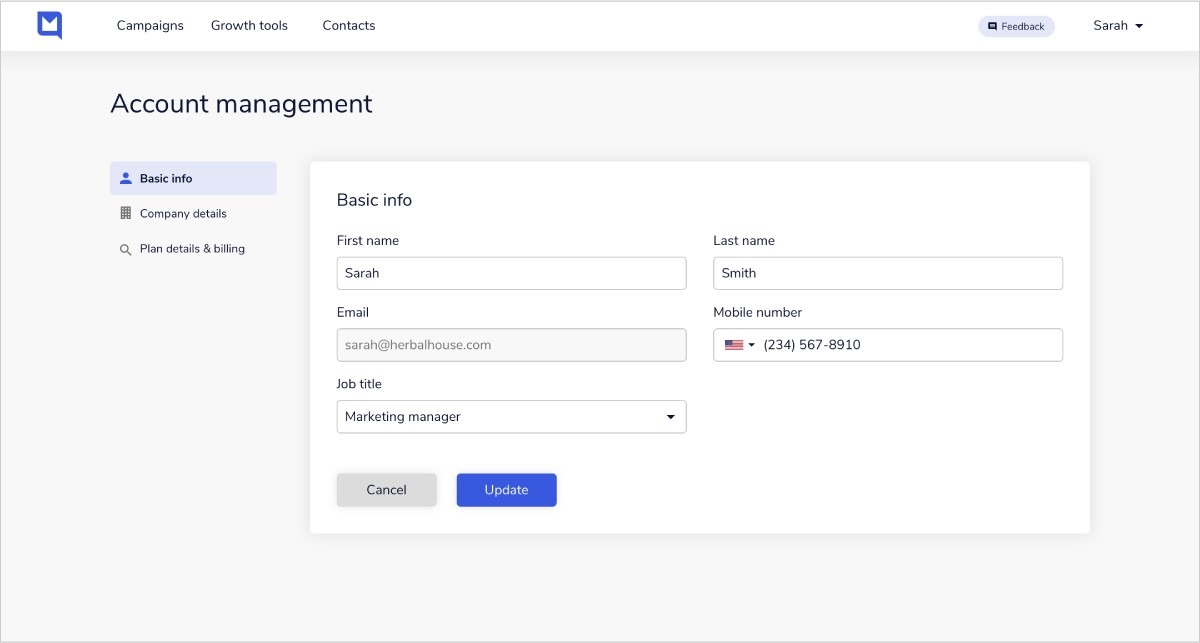
Once on the **Account management page**, you’ll be able to click through three sections found on the left-hand side menu, namely your **Basic info**, your **Company details,** and your **Plan details and billing**.
We’ve outlined these sections below:
### **1. Basic info**
All the pre-populated fields in this section contain information you shared with Mobiz upon sign-up. To fill in any missing information, click on **any empty field** and input your details. You can change or update any information that’s incorrect by clicking on the field and adding the right information.
***Note****: You cannot change your email address associated with your account at this stage.*
[](https://downloads.intercomcdn.com/i/o/431666692/903fdd5ffa8c99fc6d51b0d7/fb7367fa-978b-401d-80d1-7cc276aaffdc?expires=1782825300&signature=a288b863ec300c8260e999caa017e7dd8b2f3f77dd8691eec797320b93677136&req=cCMmEM94m4hdFb4f3HP0gHOd5XDAS5qxzDraXDUvKFNtie3TQQP6nMnzbW8N%0ABzLCaGakghN2%2BlNxUA%3D%3D%0A)
### **2. Company Details**
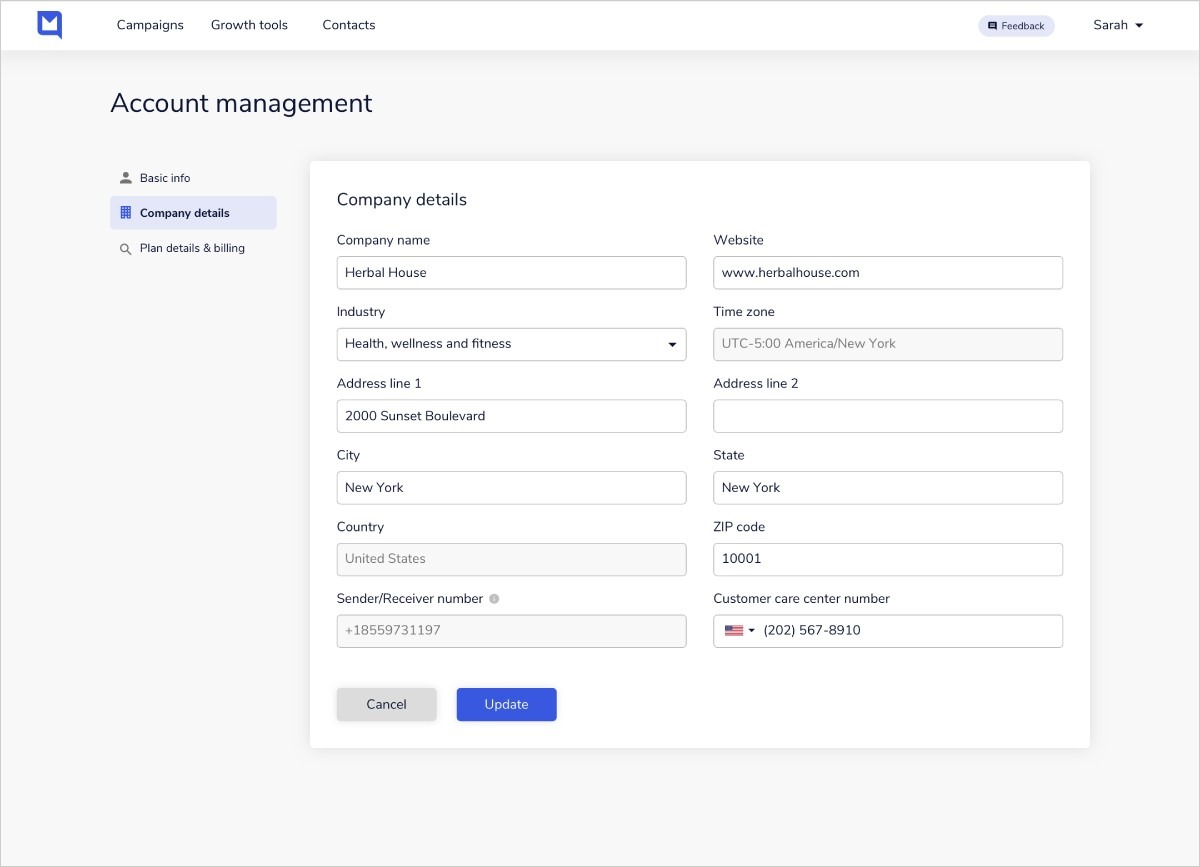
This section contains all your company information such as location, website address, company address and your important **customer care number.** Entering this number is required before being able to access several Mobiz features like [Uploading Contacts](https://help.getmobiz.comhttps://knowledge.mobiz.co/en/articles/4929152-uploading-contacts) or [creating Text-to-join keywords](https://help.getmobiz.comhttps://knowledge.mobiz.co/en/articles/5497009-creating-text-to-join-keywords)and campaigns.
Your customer care number is a business phone number your customers can use to contact you if they have questions or require further support. Upon completion of the empty field, the number will be automatically added wherever required in the Mobiz app.
Another important field to take note of is the **Sender/Receiver number.** This is the unique number that gets assigned to you when signing up to Mobiz, and will be used to send or receive messages.
To save any updates made, click **Update**.
*Please note: Should you wish to use your own **Sender / Receiver number**, you can reach out to our support team at any time.*
[](https://downloads.intercomcdn.com/i/o/431668279/38c8d601447a6c5ebff9d9f7/e388c267-9e94-4bfc-8e54-fa5d58b78a70?expires=1782825300&signature=b7b889b8d0f847d3d8c22269281ab2039f77be02a7f46a2cc230daa91c98591c&req=cCMmEM92n4ZWFb4f3HP0gM9zW29U6aP1QyK%2FcTriBWzIs%2FsQYEkx14jp90yZ%0AWYffp7L95KDTEY%2F3xQ%3D%3D%0A)
### **3. Plan details & billing**
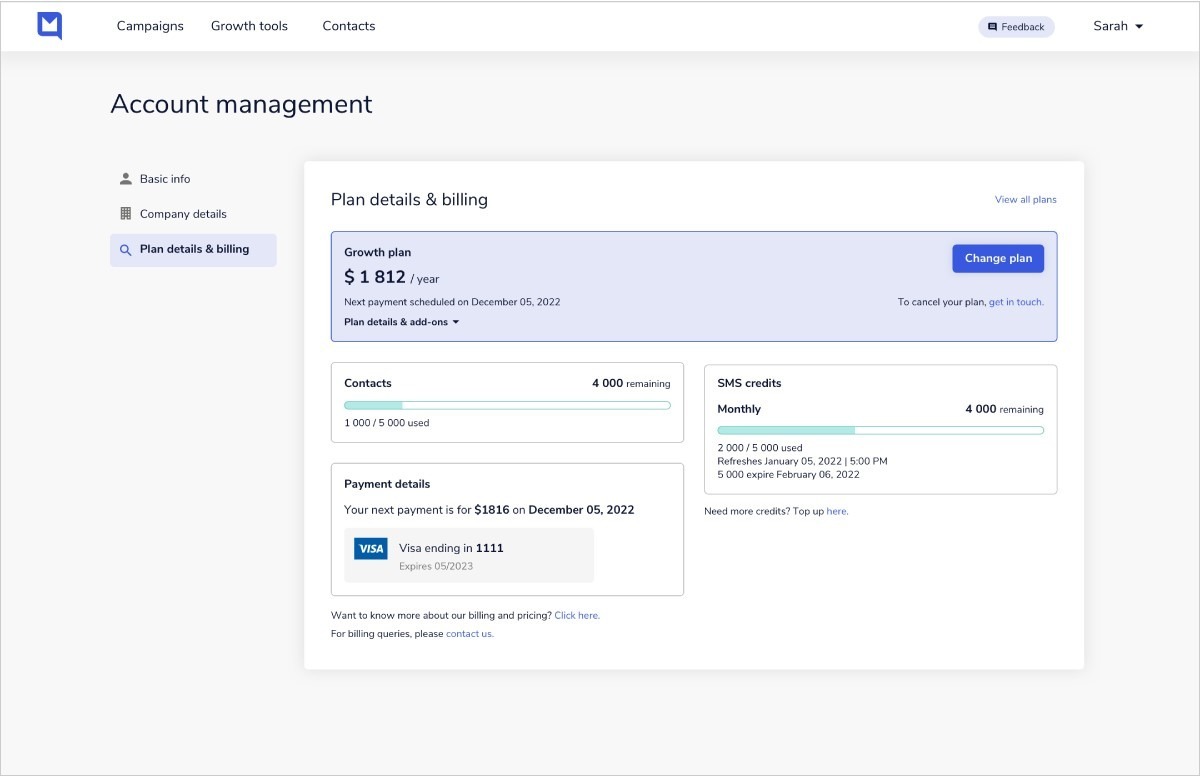
Here you’ll find your plan details and billing information. The first, highlighted area on the page indicates your current plan, next payment due date, as well as any additional add-ons to your plan.
To upgrade or change to a new plan, hit **Change plan**.
*Note: If ever you want to cancel your Mobiz subscription, simply reach out to our team for assistance by clicking get in touch.*
[](https://downloads.intercomcdn.com/i/o/431669152/5b68b937ce3bb4c0feebf9ea/cf0b6e8c-09db-4562-bda6-4672569c9a8e?expires=1782825300&signature=07e276f68613057a091e9f0eee5e286772a7848c11377647f97e4ad6a76843b4&req=cCMmEM93nIRdFb4f3HP0gMqsLqSVjVMxOr4dqqP1VOwYz5BhwDyLgDH0R6e7%0AZz5VAqehqiEZ0RZDnA%3D%3D%0A)
Underneath your plan details, you'll find areas for **Contacts, SMS Credits** and P**ayment details**, respectively.
### **Contacts**
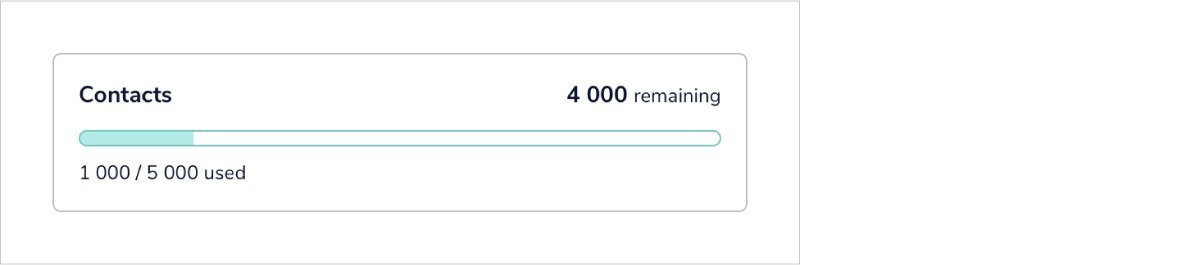
The **Contacts** area shows how many contact uploads you still have remaining. The contact upload cap varies and is dependent on your plan.
[](https://downloads.intercomcdn.com/i/o/431670281/527c38284dbc4c1b9ec7d5c7/3ff3289b-fde1-4319-8b73-a4118b2c5562?expires=1782825300&signature=8e999bbb4fd0c84e9688b2679c30b36b711ece2313b9e9aca12455689c7af6da&req=cCMmEM5%2Bn4leFb4f3HP0gGTO3bRrSqG74uooIsGmkomAhY%2BmjQZjuK5nBf9V%0AUAaBFnLJTbR9WiJ3Hg%3D%3D%0A)
### **SMS Credits**
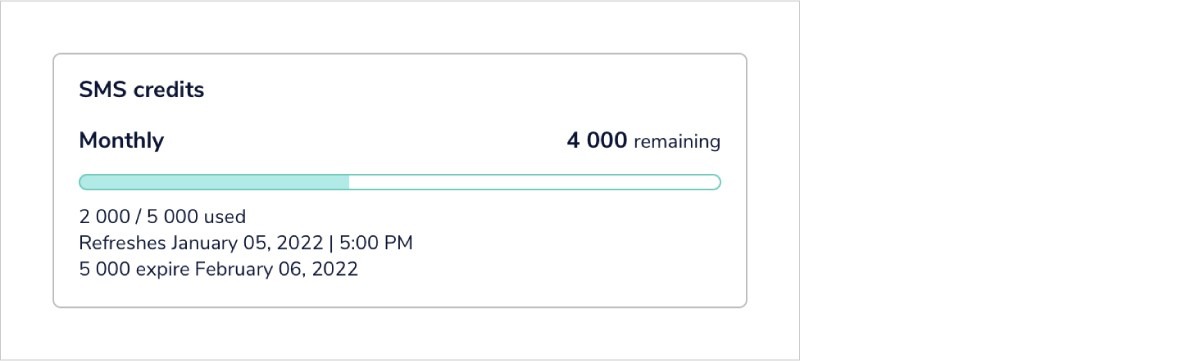
The **SMS credits** area keeps track of how many credits you’ve used and how many you have remaining. You can also view the expiry date of any unused credits here.
Used credits get replenished each billing month with the number of credits associated with your chosen plan.
*Note: Trial users’ credits do not get replenished.*
[](https://downloads.intercomcdn.com/i/o/431671677/218c275b90f1e96dd32e57cc/09a76a67-04e6-49ec-8e0d-e462cc3a15f9?expires=1782825300&signature=6f77bf5625f0ba88f451324fcb814d40e9271316b639acb5876fc4fe2e17afdd&req=cCMmEM5%2Fm4ZYFb4f3HP0gF30Tp0%2BVm%2FEzCMrqvwCe%2FYYrV1kYGmzq0wDm%2BJG%0AW1zcYWMXLPBlZ%2FXDjw%3D%3D%0A)
### **Payment details**
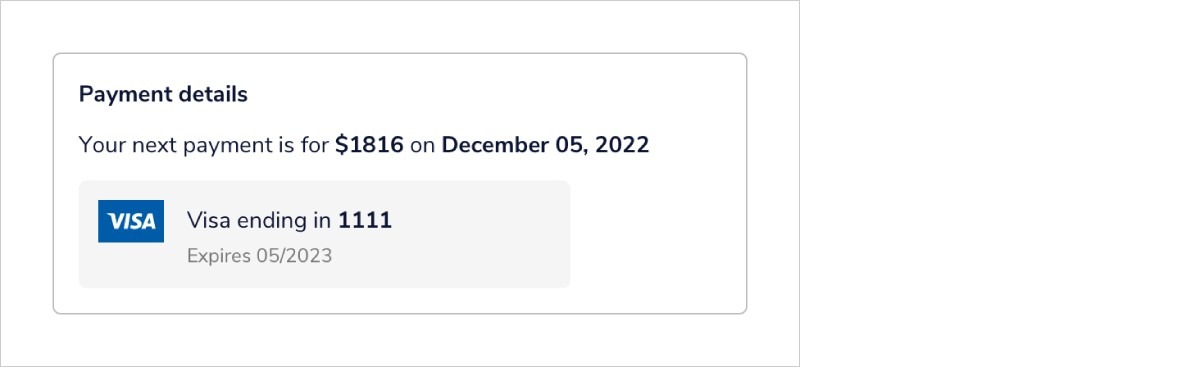
The Payment details area displays the number and date of your next payment due, as well as the credit card associated with your account.
*Note: If you want to update your Mobiz billing details, simply reach out to our team for assistance by clicking contact us.*
[](https://downloads.intercomcdn.com/i/o/431673480/2a47949084b7bff3cb9213a8/845bbab0-7cd3-4eac-8736-fcb20aaff19d?expires=1782825300&signature=f688185605bdfc47f8bfb8132c1c0d464d2a55f8deffcb6204d26fd1a53d43a2&req=cCMmEM59mYlfFb4f3HP0gI84maWTDsu0n%2BpfSB3j49N76iacZ%2FjhbkwAWgcY%0AtQKFZfk5nn79lFknNg%3D%3D%0A)
- [Getting started with Mobiz](https://help.getmobiz.com/getting-started-with-mobiz?hsLang=en#main-content)
- [1. Sign up](https://help.getmobiz.com/getting-started-with-mobiz?hsLang=en#1-sign-up)
- [2. Pick a number type & get verified](https://help.getmobiz.com/getting-started-with-mobiz?hsLang=en#2-pick-a-number-type-get-verified)
- [3. Setup your branded link](https://help.getmobiz.com/getting-started-with-mobiz?hsLang=en#3-setup-your-branded-link)
- [4. Import your existing contacts & grow your list](https://help.getmobiz.com/getting-started-with-mobiz?hsLang=en#4-import-your-existing-contacts-grow-your-list)
- [5. Send Campaigns](https://help.getmobiz.com/getting-started-with-mobiz?hsLang=en#5-send-campaigns)
- [Mobiz tutorials](https://help.getmobiz.com/mobiz-tutorials?hsLang=en)
- [Using Mobiz](https://help.getmobiz.com/using-mobiz?hsLang=en#main-content)
- [Contacts & Lists](https://help.getmobiz.com/using-mobiz?hsLang=en#contacts-lists)
- [Campaigns](https://help.getmobiz.com/using-mobiz?hsLang=en#campaigns)
- [Personalized landing pages](https://help.getmobiz.com/personalized-landing-pages?hsLang=en)
- [Compliance](https://help.getmobiz.com/compliance?hsLang=en)
- [Integrations](https://help.getmobiz.com/integrations?hsLang=en#main-content)
- [Hubspot](https://help.getmobiz.com/integrations?hsLang=en#hubspot)
- [HighLevel](https://help.getmobiz.com/integrations?hsLang=en#highlevel)
- [Zapier](https://help.getmobiz.com/integrations?hsLang=en#zapier)
[](http://mobiz.co)
Copyright © 2026, Mobiz