
Add your own custom branded link to your Mobiz account to increase click-through rates and help improve text message deliverability.
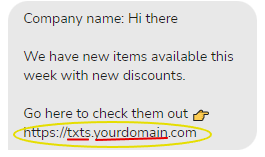
Branded links are now an essential requirement on Mobiz to help with:
- Improving link trust which in turn increases your click-through rates
- Improving text message deliverability through the major carriers due to newer compliance changes
For example, Mike’s Pizza Place = sms.mikespizzaplace.com
How to setup your Branded Link on Mobiz
First, it is important to know that you have 2 options for setting up your branded link:
Option A: Sub Domain (most preferred) is using an unused sub domain on your full website domain. For example, https://sms.yourdomain.com.
Option B: Full Domain is using the full website domain only for Mobiz.
For example https://yourdomain.com.
Instructions
- Head to Account management within the profile dropdown.
- Select Branded link.
- Select Add CNAME.
- Insert domain and hit Save.
- If you are going with Option A insert subdomain.domain.com.
- If you are going with Option B insert just domain.com.
- Following connecting your domain instructions add the DNS settings on your Domain Registrar.
- Refer to Option A or B instructions accordingly for the exact values to input.
- After entering DNS settings navigate back to your Mobiz Account and then select Verify connection.
The name of your CNAME or subdomain record can be anything such as sms, vip, txt, etc. but it needs to correspond to TXT record asuid.subdomain.
For example: CNAME = vip TXT = asuid.vip | CNAME = sms TXT = asuid.sms
Connect Branded Link via Sub Domain Method
Add the following records to your domain, under the DNS settings.
Create a CNAME record in your DNS settings
How to add a CNAME record on GoDaddy
Name: sms
Value: mobiz-smart-proxy-app-prod.azurewebsites.net
If there is a TTL field you can set that to the lowest option i.e.15 minutes, ½ hour, or hour.
Create a TXT record
How to add a TXT record on GoDaddy
Name: asuid.sms
Value: 4748406CA11D764513B3A046FCEED15C2750D0789D54A43BBC85181C9AA89163
If there is a TTL field you can set that to the lowest option i.e.15 minutes, ½ hour, or hour.
Connect Branded Link via Full Domain Method
Add the following records to your domain, under the DNS settings.
Add an “A” Record
Host = @
Value = 40.76.163.210
Add a TXT record
Host = asuid
Value = 4748406CA11D764513B3A046FCEED15C2750D0789D54A43BBC85181C9AA89163
Possible responses
Status updates to Generating SSL certificate.
If the status updates to Generating SSL certificate your domain has been verified and give the team at Mobiz at least 24 hours to connect your domain before sending any campaigns.
An error toast appears
An error toast may appear when you select Verify connection as sometimes this can take a bit of time to reflect.
Status updates to Error: values don’t match
Please recheck your DNS settings or your entered domain within Mobiz. You may edit the domain by clicking the edit pen next to the domain entered and then select Retry.
Check back in 24 hours and your new custom domain status should have status Connected.
If you run into any issues, don’t hesitate to email help@getmobiz.com or message us on our live chat for help!