---
title: How to add/edit your payment method in your Mobiz account
description: This article explains how to add a card when starting on pay-as-you-go or update your card details later.
---
[Skip to content](https://help.getmobiz.com/how-to-add/edit-your-payment-method-in-your-mobiz-account-mobiz-help-center#main-content)
English
Show submenu for translations
[Create a Support Ticket](https://help.getmobiz.com/kb-tickets/new?hsLang=en)

Open main navigation
Close main navigation
- English
Show submenu for translations
- [Create a Support Ticket](https://help.getmobiz.com/kb-tickets/new)
- [Contact us](mailto:help@getmobiz.com)
[Contact us](mailto:help@getmobiz.com)
How can we help you?
- There are no suggestions because the search field is empty.
1. [Mobiz Help Center](https://help.getmobiz.com/?hsLang=en)
2. [Getting started with Mobiz](https://help.getmobiz.com/getting-started-with-mobiz?hsLang=en)
3. [1. Sign up](https://help.getmobiz.com/getting-started-with-mobiz?hsLang=en#1-sign-up)
# How to add/edit your payment method in your Mobiz account
## This article explains how to add a card when starting on pay-as-you-go or update your card details later.
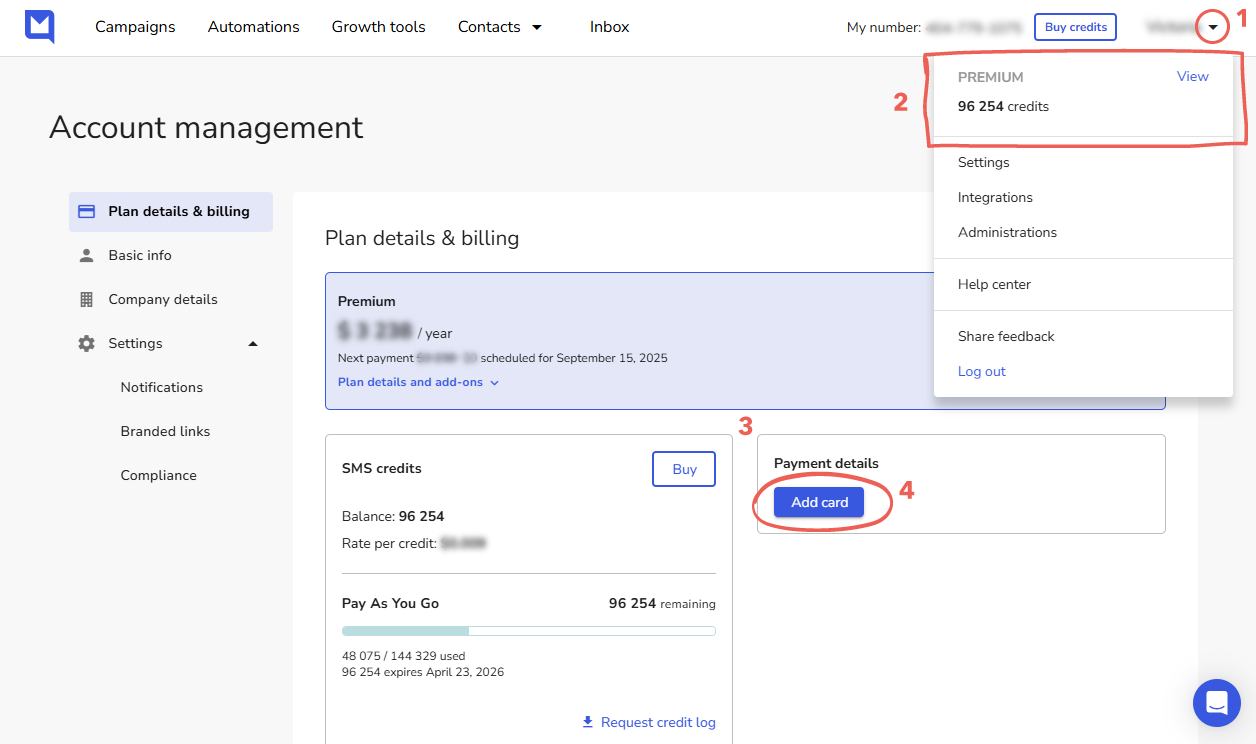
How to add or update your payment method:
1. Click your profile icon in the top-right corner.
2. Select your plan name from the top of the dropdown menu.
3. On "Plan details & billing", navigate to the Payment details block on the right.
4. Click "Add card" to add a new payment method, or use the link below your current card to update it.
[](https://downloads.intercomcdn.com/i/o/ny7pgmwv/1576445221/705449389b93e2a35dffa783a461/image1.png?expires=1782825300&signature=e29d39cac649d1ac0776dc460ca773092fcdefd6b01e2aef1930924b52abe624&req=dSUgEM16mINdWPMW1HO4zeu38XqsL629exzn8Z8T3I8YxKHeZifrJtq6WQnq%0An4NigfqcSQNxH%2FcqlDo%3D%0A) [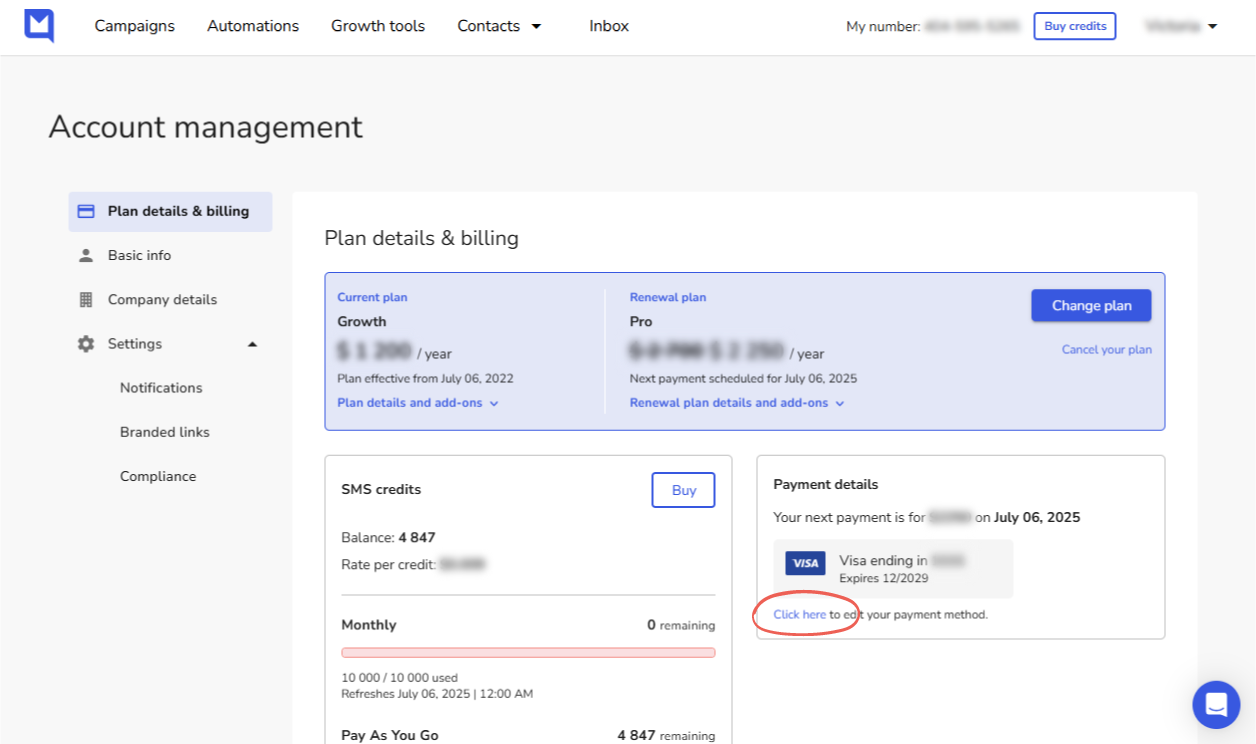](https://downloads.intercomcdn.com/i/o/ny7pgmwv/1576445421/d172d38679d6c026e388e1324193/image2.png?expires=1782825300&signature=283906442359bc616f40e0ddefba49ee52671890d258926d1d0f4b26ef9bff4d&req=dSUgEM16mIVdWPMW1HO4zSzfZVpI5Pumq8CqiphI4nMZbgu5ulMBbzhAUNDB%0A6HPyfxLC8mbPNkIkLjg%3D%0A)
- [Getting started with Mobiz](https://help.getmobiz.com/getting-started-with-mobiz?hsLang=en#main-content)
- [1. Sign up](https://help.getmobiz.com/getting-started-with-mobiz?hsLang=en#1-sign-up)
- [2. Pick a number type & get verified](https://help.getmobiz.com/getting-started-with-mobiz?hsLang=en#2-pick-a-number-type-get-verified)
- [3. Setup your branded link](https://help.getmobiz.com/getting-started-with-mobiz?hsLang=en#3-setup-your-branded-link)
- [4. Import your existing contacts & grow your list](https://help.getmobiz.com/getting-started-with-mobiz?hsLang=en#4-import-your-existing-contacts-grow-your-list)
- [5. Send Campaigns](https://help.getmobiz.com/getting-started-with-mobiz?hsLang=en#5-send-campaigns)
- [Mobiz tutorials](https://help.getmobiz.com/mobiz-tutorials?hsLang=en)
- [Using Mobiz](https://help.getmobiz.com/using-mobiz?hsLang=en#main-content)
- [Contacts & Lists](https://help.getmobiz.com/using-mobiz?hsLang=en#contacts-lists)
- [Campaigns](https://help.getmobiz.com/using-mobiz?hsLang=en#campaigns)
- [Personalized landing pages](https://help.getmobiz.com/personalized-landing-pages?hsLang=en)
- [Compliance](https://help.getmobiz.com/compliance?hsLang=en)
- [Integrations](https://help.getmobiz.com/integrations?hsLang=en#main-content)
- [Hubspot](https://help.getmobiz.com/integrations?hsLang=en#hubspot)
- [HighLevel](https://help.getmobiz.com/integrations?hsLang=en#highlevel)
- [Zapier](https://help.getmobiz.com/integrations?hsLang=en#zapier)
[](http://mobiz.co)
Copyright © 2026, Mobiz