---
title: Composing a message
description: Composing a message
---
[Skip to content](https://help.getmobiz.com/composing-a-message#main-content)
English
Show submenu for translations
[Create a Support Ticket](https://help.getmobiz.com/kb-tickets/new?hsLang=en)

Open main navigation
Close main navigation
- English
Show submenu for translations
- [Create a Support Ticket](https://help.getmobiz.com/kb-tickets/new)
- [Contact us](mailto:help@getmobiz.com)
[Contact us](mailto:help@getmobiz.com)
How can we help you?
- There are no suggestions because the search field is empty.
1. [Mobiz Help Center](https://help.getmobiz.com/?hsLang=en)
2. [Mobiz tutorials](https://help.getmobiz.com/mobiz-tutorials?hsLang=en)
# Composing a message
## Tips and guidelines for writing effective message copy in Mobiz campaigns to boost engagement and drive better results.
The success of your campaign starts with how your message is presented. In plain text (SMS) campaigns, your words set the tone and drive engagement. In picture message (MMS) campaigns, the image captures attention first. In both cases, well-crafted copy is key to increasing clicks, responses, and overall interaction.
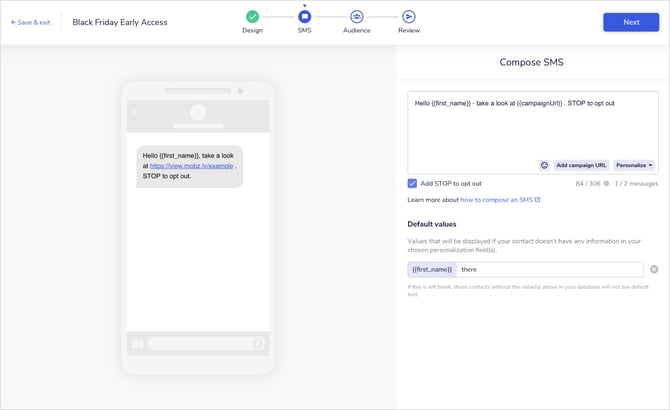
### Key points to consider when composing your message
#### Character limits
- You can use up to 1 530 characters in your plain text message (SMS). Each SMS segment is 160 characters long. If your message exceeds 160 characters, it will split into multiple segments. 1 SMS segment (message) = 1 credit
- Emojis and non-GSM characters usually take up 2 characters each, which reduces the available characters in your message by more than half.
To see how many segments your message will use and the corresponding number of credits, use the message counter at the bottom of the text editor. Read more on characters and message limits [here](https://help.getmobiz.com/how-characters-affect-message-credits-mobiz-help-center?hsLang=en).
#### Picture messages (MMS)
Adding an image turns your message into an MMS, which is charged at 3 credits per message with 1 570 characters available. If your plain text message (SMS) is 4-5 segments long, consider adding an image to reduce costs and better engage your audience. Read about MMS best practices [here](https://help.getmobiz.com/best-practices-for-creating-an-mms-mobiz-help-center?hsLang=en).
#### Campaign links
There are two types of links available in Mobiz campaigns:
1. **Landing page link:** Required for landing page campaigns. You cannot review or send your message without it.
2. **Shortened link:** If you insert your own URL, our platform automatically generates a shortened link to save characters, track clicks, and enhance readability.
Each link is the length of your custom domain plus 8 additional characters.
#### GSM-encoded characters
SMS uses GSM-encoded characters. Our platform automatically converts non-GSM characters to ensure they don't consume more characters than necessary. This may result in special characters appearing differently, and hyperlinks may be removed. View the SMS character replacements [here](https://help.getmobiz.com/sms-character-replacements?hsLang=en).
#### Stop to opt-out
By default, "STOP to opt out" copy is included as suggested by regulations. If a customer replies with STOP, STOPALL, UNSUBSCRIBE, CANCEL, END, or QUIT, they will automatically be unsubscribed. They can only be re-subscribed through explicit consent, such as via a text-to-join campaign.
**Note:** STOP to opt out functionality will always be active, even if the copy is not included in your SMS.
#### Adding personalization
Personalizing your message makes it feel more relevant and helps boost trust and click-through rates. At the very least, include the recipient's first name.
Personalization tags are estimated at 10 characters to calculate credits, but the actual count is updated on the review page using your audience data.
Learn more about personalization and default values [here](https://help.getmobiz.com/personalization-default-values-mobiz-help-center?hsLang=en).
- [Getting started with Mobiz](https://help.getmobiz.com/getting-started-with-mobiz?hsLang=en#main-content)
- [1. Sign up](https://help.getmobiz.com/getting-started-with-mobiz?hsLang=en#1-sign-up)
- [2. Pick a number type & get verified](https://help.getmobiz.com/getting-started-with-mobiz?hsLang=en#2-pick-a-number-type-get-verified)
- [3. Setup your branded link](https://help.getmobiz.com/getting-started-with-mobiz?hsLang=en#3-setup-your-branded-link)
- [4. Import your existing contacts & grow your list](https://help.getmobiz.com/getting-started-with-mobiz?hsLang=en#4-import-your-existing-contacts-grow-your-list)
- [5. Send Campaigns](https://help.getmobiz.com/getting-started-with-mobiz?hsLang=en#5-send-campaigns)
- [Mobiz tutorials](https://help.getmobiz.com/mobiz-tutorials?hsLang=en)
- [Using Mobiz](https://help.getmobiz.com/using-mobiz?hsLang=en#main-content)
- [Contacts & Lists](https://help.getmobiz.com/using-mobiz?hsLang=en#contacts-lists)
- [Campaigns](https://help.getmobiz.com/using-mobiz?hsLang=en#campaigns)
- [Personalized landing pages](https://help.getmobiz.com/personalized-landing-pages?hsLang=en)
- [Compliance](https://help.getmobiz.com/compliance?hsLang=en)
- [Integrations](https://help.getmobiz.com/integrations?hsLang=en#main-content)
- [Hubspot](https://help.getmobiz.com/integrations?hsLang=en#hubspot)
- [HighLevel](https://help.getmobiz.com/integrations?hsLang=en#highlevel)
- [Zapier](https://help.getmobiz.com/integrations?hsLang=en#zapier)
[](http://mobiz.co)
Copyright © 2026, Mobiz